

Last updated: November 2026. We keep this page current when Apple, Google or the mobile networks change something.
An SMS is quick to write. Still, our support team gets the same questions every week: Why were three messages charged for 150 characters? Why doesn’t the iPhone fill in the code automatically? Why is there no preview for the link? This page answers all of them in one place. Use it as a reference, pass it on to your developers, and feel free to bookmark it.
In this article:
- Characters and length
- Sender ID
- One-time codes (OTP) that fill themselves in
- Links and link previews
- Content and deliverability
- Legal and timing
- Tech: delivery reports, validity, abuse protection
- The printable summary
1. Characters and length
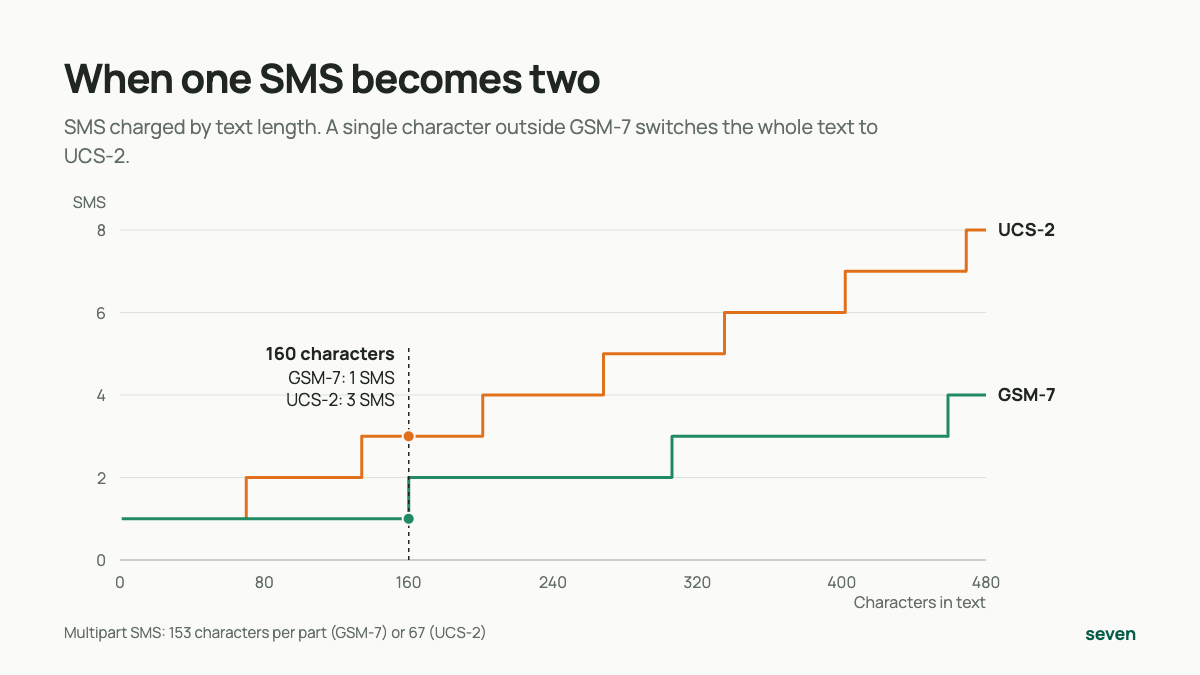
How much text fits into one SMS depends on the character set. As long as your text only uses characters from the GSM-7 alphabet (GSM 03.38), one SMS holds 160 characters. Add a single character that GSM-7 doesn’t know, and the whole text is encoded as UCS-2. Then only 70 characters fit.
| Encoding | Single SMS | Per part of a multipart SMS |
|---|---|---|
| GSM-7 | 160 characters | 153 characters |
| UCS-2 (Unicode) | 70 characters | 67 characters |
Longer messages are split into several parts that the phone puts back together. Each part needs a small invisible header, which is why a part only holds 153 characters instead of 160. Every part is charged as one SMS.
What’s in GSM-7
Letters A to Z, digits, common punctuation, and also German umlauts like ä ö ü ß and some accented letters such as é è à. For English and most Western European text, GSM-7 is all you need.
These characters are part of GSM-7 but count double:
€ [ ] { } \ ~ ^ |The hidden UCS-2 triggers
The most expensive characters are the ones you don’t see. If you write your text in Word, Outlook or on your phone and paste it in, you often get these automatically:
- curly quotes
“ ” ‘ ’instead of"and' - an en dash
–instead of a hyphen- - an ellipsis
…as one character instead of... - a non-breaking space that looks exactly like a normal one
- accents GSM-7 doesn’t know, e.g.
á í ó ú êor Turkish letters likeı ş ğ - emojis
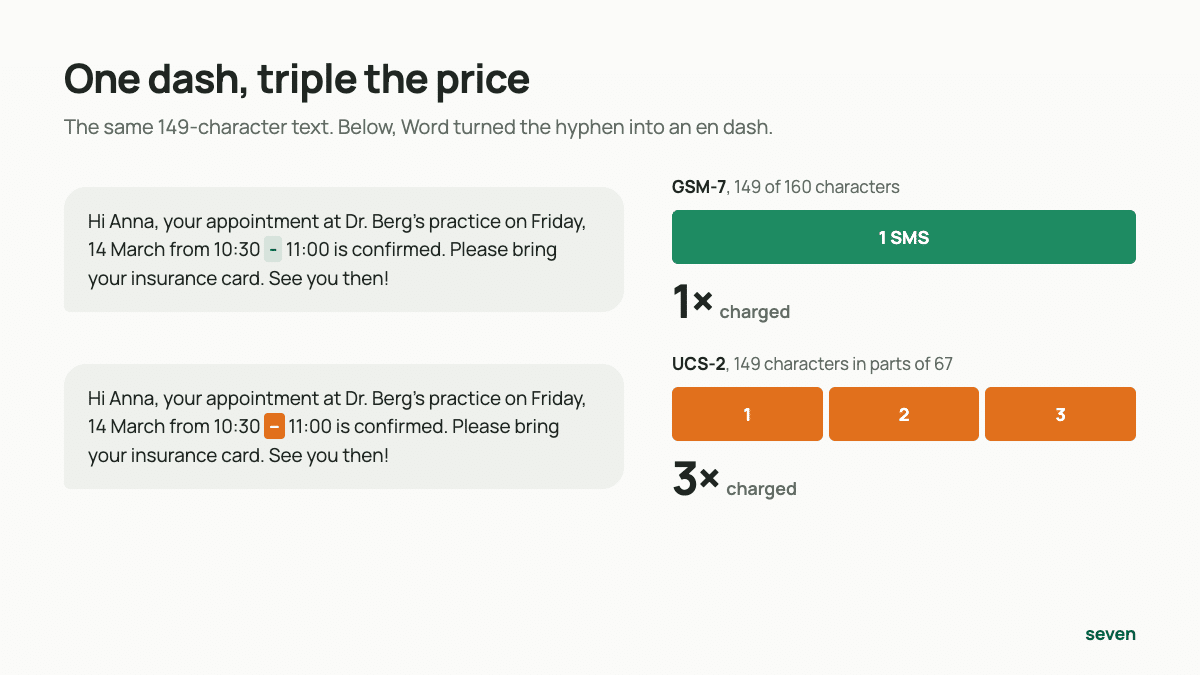
A tiny detail like that triples the price in the example above. Two ways to prevent it:
- Check before sending: Our SMS character counter shows you, character by character, what’s GSM-7 and what isn’t.
- Let us replace them: Under Settings > Messages > SMS settings, choose Replace special characters for the character set. We then turn
“into"and–into-whenever that keeps the SMS out of UCS-2. Emojis or Cyrillic text stay unchanged, of course.
If you use emojis on purpose, keep in mind that most of them take up two characters in UCS-2, and combinations like family or skin tone emojis even more. More on that in the help article Send emojis.
Tip: Under Settings > Messages > SMS settings you can also set a maximum number of parts per SMS. An accidentally long text then never goes out.
2. Sender ID
You can send either from a name or from a phone number.
- Alphanumeric sender: up to 11 characters, e.g.
YourBrand. Stick to letters and digits; special characters and spaces aren’t transmitted correctly everywhere. - Phone number: sent in international format. Your own number has to be verified first, so nobody can misuse someone else’s number as a sender.
The key difference: Nobody can reply to an alphanumeric sender. If your recipients should be able to answer, for example to cancel an appointment, you need a phone number as the sender, ideally your own inbound number. By the way, iPhones still show a reply field for alphanumeric senders, but the reply goes nowhere.
And stick with one sender. If you text as YourBrand today, YourBrandUK tomorrow and from a number the day after, you look like a scammer to both recipients and spam filters.
Not the same everywhere
Every country sets its own rules for alphanumeric senders. Some require registration in advance, in others the networks always replace them with a number. The US and Canada don’t support alphanumeric senders at all.
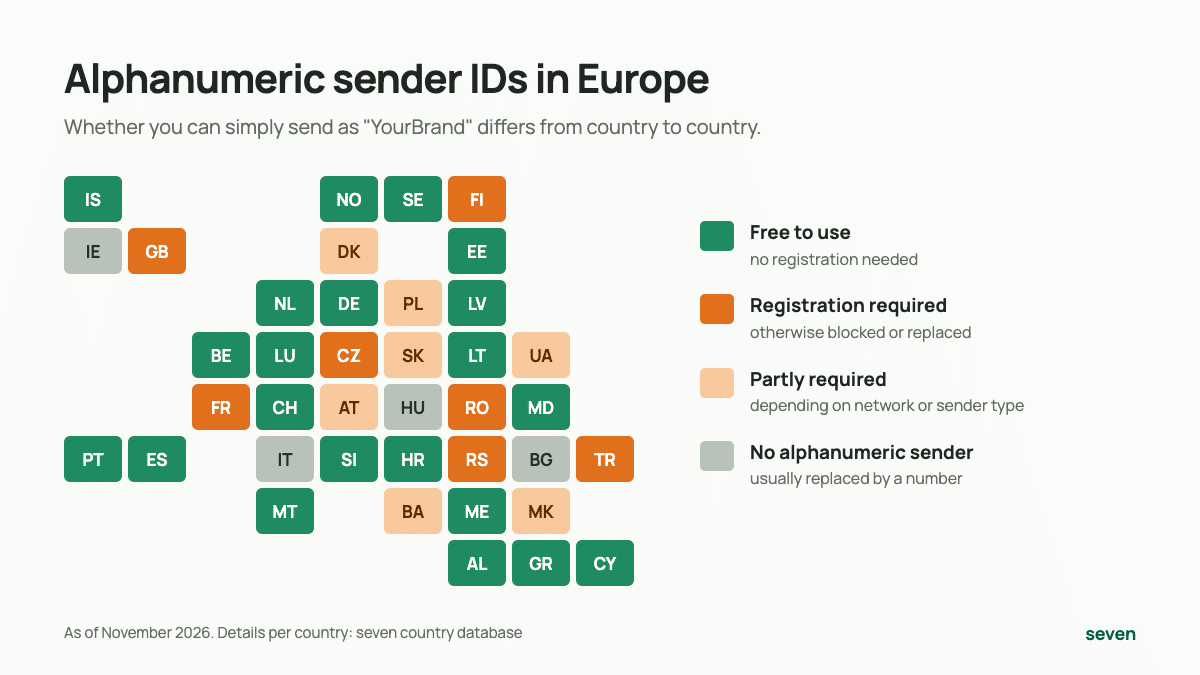
For Austria you register the sender yourself in the dashboard under Settings > Compliance, see Sender ID pre-registration. For all other countries, our support team will help. For an overview of the rules, see our article International communication: country-specific rules for your SMS campaign.
3. One-time codes (OTP) that fill themselves in
If you offer login by SMS code, you mainly want one thing: the code should land in the form without anyone typing it. iPhone and Android can do that, but only if the SMS is written so they recognize the code.
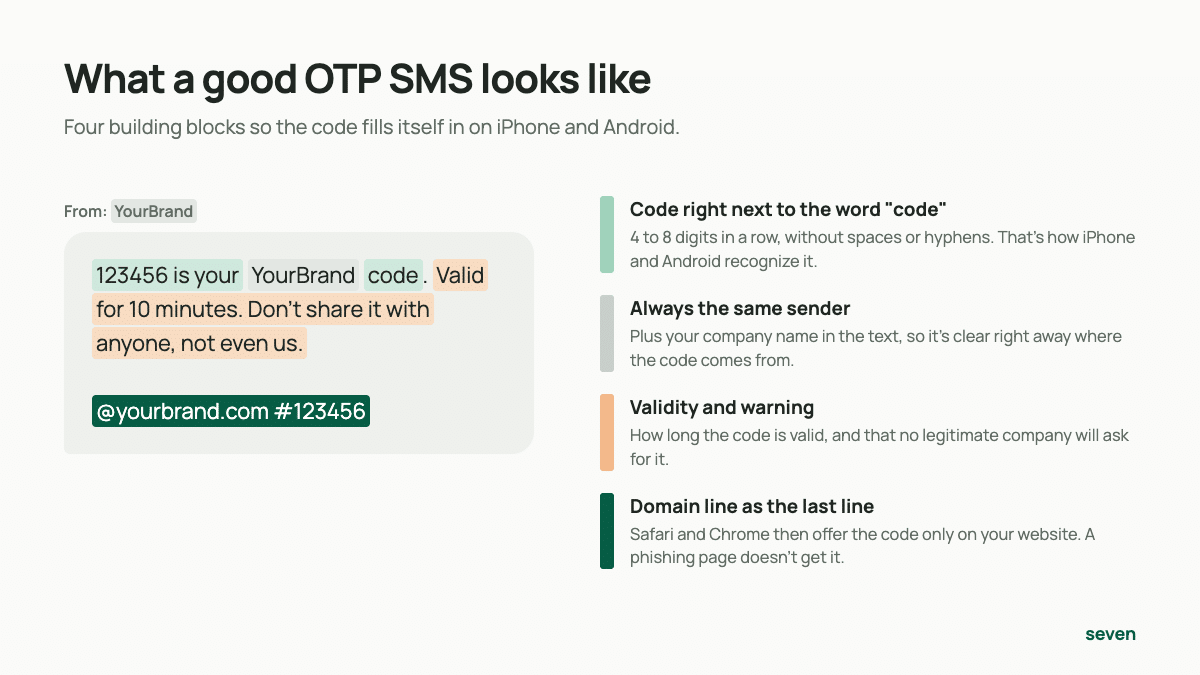
The text
- Put the word “code” right next to the code. iPhones look for words like “code” near a string of characters. 4 to 8 digits in a row, without spaces or hyphens, work reliably.
123 456or123-456may look easier to read, but they aren’t recognized reliably. - Code first. Notifications often only show the beginning of a message. If the code is there, the user doesn’t even need to open the SMS.
- Add your company name and a warning. So it’s clear where the code comes from, and that no legitimate company will ever ask for it on the phone.
- No links in a code SMS. That’s exactly what phishing messages look like. The code belongs in your form, not behind a link.
- Always the same sender. See above.
The domain line: phishing protection included
Add your domain and the code as the last line, in exactly this format:
123456 is your YourBrand code. Valid for 10 minutes.

@yourbrand.com #123456
The line starts with @ and the domain without https://, then one space and # followed by the code. Safari on iPhone and Mac and Chrome on Android then offer the code only on yourbrand.com. If a customer ends up on a fake login page, the code isn’t suggested there. A nice side effect that costs nothing.
Android apps: the app hash
For your own Android app, Google offers the SMS Retriever API. It lets the app read the code without any action from the user. Requirements: the SMS contains an 11-character hash that identifies your app, and it’s no longer than 140 bytes. That’s 160 characters in GSM-7, but only 70 in UCS-2. One emoji in the text and the SMS is too long. Your developers generate the hash once; the steps are in Google’s documentation.
The input field
The phone can only insert the code if the field says it’s meant for one:
- Website:
<input type="text" inputmode="numeric" autocomplete="one-time-code">. Please don’t usetype="number", or leading zeros disappear. - iOS app:
textContentType = .oneTimeCode - Android app: SMS Retriever API or SMS User Consent API
Validity and plan B
A code that expires after 10 minutes doesn’t need 48 hours of delivery attempts. Set a short validity (more under Tech). And in case no SMS arrives, offer a phone call that reads the code out.
Testing is easy: Send the SMS to yourself. If the code is underlined on the iPhone and shows up above the keyboard, you’re good.
4. Links and link previews
A link is quickly added to an SMS. Whether it turns into a nice preview with image and title or stays a plain blue address is only partly up to you.
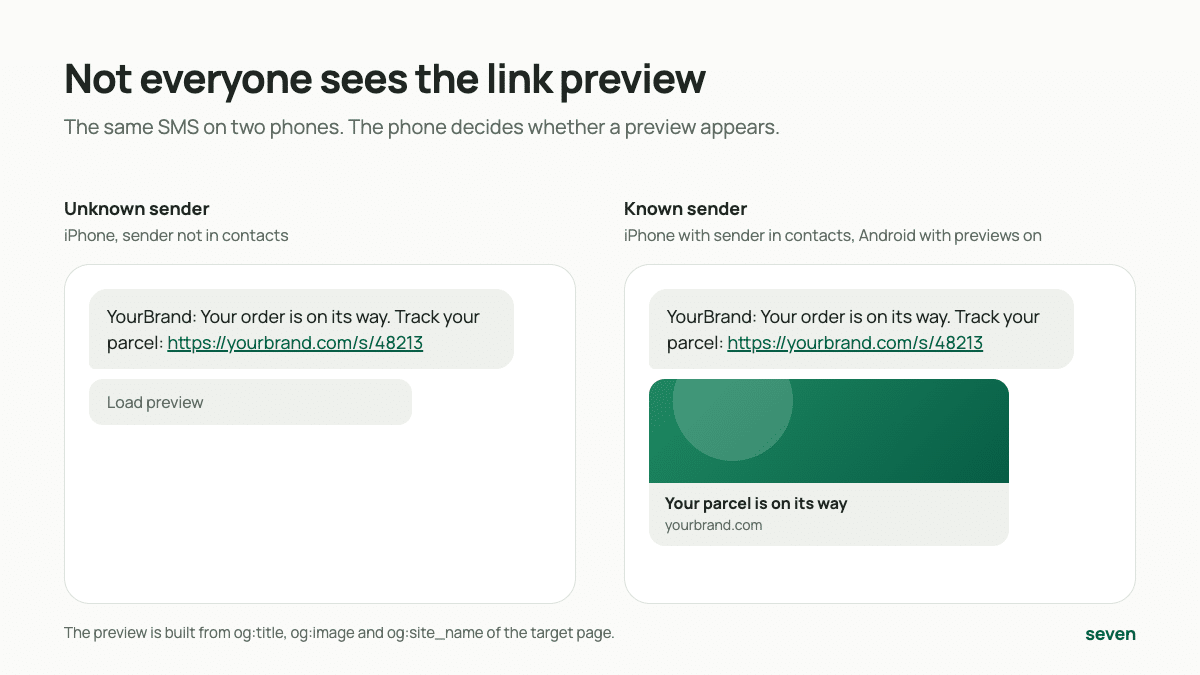
When a preview appears
- iPhone: For SMS from senders who aren’t in the contacts, the iPhone in practice doesn’t show a ready-made preview, only the option to load it. Apple doesn’t document this officially, but it matches every test we know of. For business SMS, that’s the normal case.
- Android: Google Messages shows previews depending on the user’s Automatic previews setting.
That means the preview is a bonus. Your text has to make sense without it and say where the link goes.
Making the preview look good when it does appear
The phone takes the title and image from the target page. For that, the page needs Open Graph tags in its <head>:
<meta property="og:title" content="Your parcel is on its way">
<meta property="og:image" content="https://yourbrand.com/img/parcel.jpg">
<meta property="og:site_name" content="YourBrand">
Apple recommends:
- an image at least 900 pixels wide, without text in the image
- your company name in
og:site_name, not in the title - tags in the HTML without JavaScript, redirects only server-side
The details are in Apple’s technical note on link previews.
Short links: use your own domain
Public URL shorteners like bit.ly or TinyURL aren’t popular with spam filters, because scammers like to use them to hide the real destination. In the US, carriers even reject SMS campaigns with such links. In Europe there’s no fixed rule, but filters still take a closer look.
A domain of your own, where the recipient can see who the link is from, works better. With our Performance Tracking we shorten links automatically and measure clicks per recipient. By default the short links use svn.me. You can add your own domain like go.yourbrand.com under Settings > Conversion Tracking, and we recommend exactly that.
Small things that still matter
- Put the link at the end. That keeps the text before it readable.
- Don’t glue it to punctuation. With
...at yourbrand.com/booking.some phones include the period in the link. A space before and after never hurts. - Watch the length. A long link with tracking parameters easily eats 60 characters. A short link saves space and often a whole SMS.
5. Content and deliverability
- Say who’s writing. Even with an alphanumeric sender, put your company name in the text. Notifications often only show the beginning of a message, and that’s where it’s decided whether the SMS gets read or deleted.
- Most important things first. Appointment, code, tracking number: everything that matters goes into the first sentence.
- Personal, not mass mail. Using the recipient’s name costs a few characters and immediately looks less like advertising. How to do that with placeholders is explained in Personalized SMS.
- No spam look. No ALL CAPS, no rows of exclamation marks, no promises like “FREE” or “You’ve won”. Neither the networks’ filters nor your recipients like that.
- Store numbers properly. Ideally in international format with the country code, so
+447700900123instead of07700 900123. Then the SMS also arrives when your customer is abroad or comes from another country. - Weed out bad numbers early. With number validation you see before sending whether a number exists and which network it belongs to.
6. Legal and timing
In short, not legal advice. The rules below apply in Germany and similarly in most EU countries.
- Marketing only with consent. You may only send promotional SMS to recipients who explicitly agreed beforehand. Ideally by double opt-in, and keep a record of the consent.
- Transactional SMS are different. Codes, appointment reminders and shipping updates don’t need marketing consent. But as soon as you mix in advertising, the stricter rules apply.
- Unsubscribing must be easy. Every promotional SMS needs an opt-out, e.g. “Reply STOP to unsubscribe” or a link. For STOP replies to reach you at all, you need a phone number as the sender.
- Not at night. Nobody wants a discount SMS at 11 pm. Send marketing during the day and not on Sundays; scheduled sending makes that easy to plan. Codes and alerts are exempt, of course.
- Sign a data processing agreement. If you send personal data through a service provider, you need a DPA. You can sign ours with one click in the dashboard under Settings > Legal.
More in the help article Legal basis for sending messages and in our article How the double opt-in works.
7. Tech: delivery reports, validity, abuse protection
- Check delivery reports. “Sent” only means the SMS reached the network. Whether it actually landed on the phone is only confirmed by the status report. You can receive it via webhook.
- Limit the validity. If the phone is off, the network keeps trying for up to 48 hours. That makes no sense for a code that expires after 10 minutes. Set the validity with the API parameter
ttl(in minutes) or as a default in the SMS settings. See Validity period. - Avoid flash SMS. Messages that pop up directly on the screen are no longer delivered by most networks, or only as normal SMS. Not something to build a reliable process on.
- Protect OTP forms. Unprotected one-time code forms are a favorite of bots that trigger thousands of SMS to expensive international numbers. Use a captcha, a rate limit per number and IP, a country restriction and a spending limit. All the details are in Protect against SMS and OTP bombing.
- Have a plan B. If the code doesn’t arrive by SMS, users should be able to get it read out in a phone call. With our Voice API a computer voice reads the code, and the integration works just like SMS.
8. The printable summary
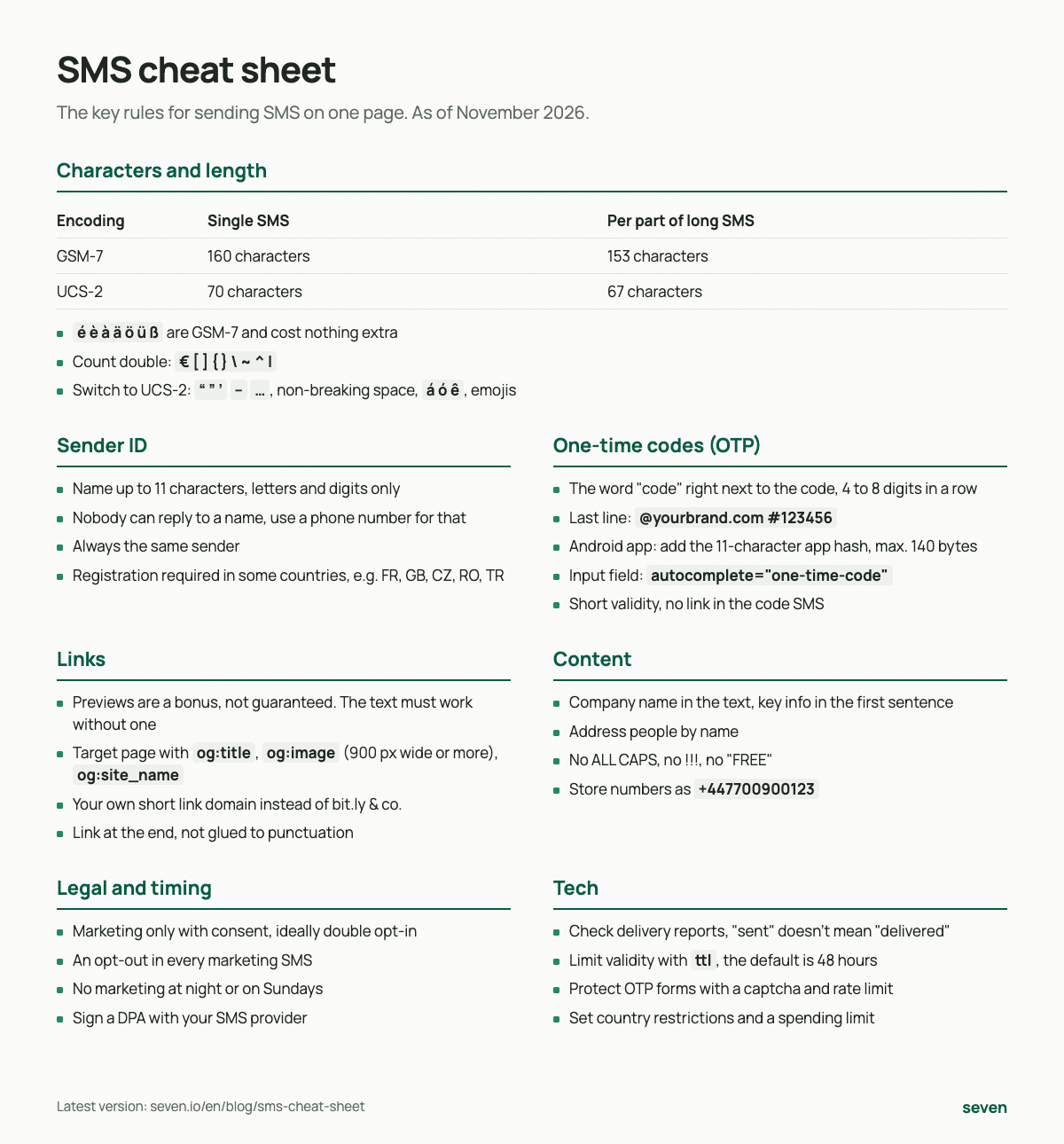
All the rules again, compact on one page. Print it, pin it to the wall or pass it on to your developers.
Questions about any of this? Write to support@seven.io, we’re happy to help.